Sideway
output.to from Sideway
`-=[]โŸจโŸฉ\;',./~!@#$%^&*()_+{}|:"<>? ๐‘Ž๐‘๐‘๐‘‘๐‘’๐‘“๐‘”โ„Ž๐‘–๐‘—๐‘˜๐‘™๐‘š๐‘›๐‘œ๐‘๐‘ž๐‘Ÿ๐‘ ๐‘ก๐‘ข๐‘ฃ๐‘ค๐‘ฅ๐‘ฆ๐‘ง ร…โ€‰โˆ’โ€‚ร—โ€ƒโ‹…โˆ“ยฑโˆ˜๊žŠ๏นฆโˆ—โˆ™ โ„ฏ ๐”ธ๐”นโ„‚๐”ป๐”ผ๐”ฝ๐”พโ„๐•€๐•๐•‚๐•ƒ๐•„โ„•๐•†โ„™โ„šโ„๐•Š๐•‹๐•Œ๐•๐•Ž๐•๐•โ„ค๐ด๐ต๐ถ๐ท๐ธ๐น๐บ๐ป๐ผ๐ฝ๐พ๐ฟ๐‘€๐‘๐‘‚๐‘ƒ๐‘„๐‘…๐‘†๐‘‡๐‘ˆ๐‘‰๐‘Š๐‘‹๐‘Œ๐‘ โˆผโˆฝโˆพโ‰โ‰‚โ‰ƒโ‰„โ‰…โ‰†โ‰‡โ‰ˆโ‰‰โ‰Œโ‰โ‰ โ‰ก โ‰คโ‰ฅโ‰ฆโ‰งโ‰จโ‰ฉโ‰ชโ‰ซ โˆˆโˆ‰โˆŠโˆ‹โˆŒโˆ โŠ‚โŠƒโŠ„โŠ…โІโЇ ๐›ผ๐›ฝ๐›พ๐›ฟ๐œ€๐œ๐œ‚๐œƒ๐œ„๐œ…๐œ†๐œ‡๐œˆ๐œ‰๐œŠ๐œ‹๐œŒ๐œŽ๐œ๐œ๐œ‘๐œ’๐œ“๐œ” โˆ€โˆ‚โˆƒโˆ…โฆฐโˆ†โˆ‡โˆŽโˆžโˆโˆดโˆต โˆโˆโˆ‘โ‹€โ‹โ‹‚โ‹ƒ โˆงโˆจโˆฉโˆช โˆซโˆฌโˆญโˆฎโˆฏโˆฐโˆฑโˆฒโˆณ โˆฅโ‹ฎโ‹ฏโ‹ฐโ‹ฑ โ€– โ€ฒ โ€ณ โ€ด โ„ โ— สน สบ โ€ต โ€ถ โ€ท ๏น ๏น‚ ๏นƒ ๏น„ ๏ธน ๏ธบ ๏ธป ๏ธผ ๏ธ— ๏ธ˜ ๏ธฟ ๏น€ ๏ธฝ ๏ธพ ๏น‡ ๏นˆ ๏ธท ๏ธธ โœ   โ   โŽด  โŽต  โž   โŸ   โ    โก โ†โ†‘โ†’โ†“โ†คโ†ฆโ†ฅโ†งโ†”โ†•โ†–โ†—โ†˜โ†™โ–ฒโ–ผโ—€โ–ถโ†บโ†ปโŸฒโŸณ โ†ผโ†ฝโ†พโ†ฟโ‡€โ‡โ‡‚โ‡ƒโ‡„โ‡…โ‡†โ‡‡ โ‡โ‡‘โ‡’โ‡“โ‡”โ‡Œโ‡โ‡โ‡•โ‡–โ‡—โ‡˜โ‡™โ‡™โ‡ณโฅขโฅฃโฅคโฅฅโฅฆโฅงโฅจโฅฉโฅชโฅซโฅฌโฅญโฅฎโฅฏ
Draft for Information Only

Content

Automation of Gavotte Ramdisk
โ€ƒโ€ƒโ€ƒUse Startup/Shutdown of Windows Settings in Computer Configuration to set policies that are applied to computer.
โ€ƒโ€ƒโ€ƒUse Logon/Logoff of Windows Settings in User Configuration to set policies that are applied to users.

Automation of Gavotte Ramdisk

By default, Gavotte Ramdisk can setup automatically. Because of the limitation of image size, maximum packed image size is 64K only, sometimes it is nesscessary to customize the setup. The automation of the Gavotte Ramdisk customization can be done as following:

  1. Use Startup/Shutdown of Windows Settings in Computer Configuration to set policies that are applied to computer.

    1. Create a startup batch file, e.g. ramdiskstart.bat, to setup the Gavotte Ramdisk and store in a directory, e.g. c:\. For example:

      md R:\Temporary
      if not exist d:\ramdiskbackup\Temporary goto N1
      xcopy d:\ramdiskbackup\Temporary\*.* R:\Temporary /E /V /C /Q /G /R /K /Y
      :N1
      EXIT
    2. Create a shutdown batch file, e.g. ramdiskend.bat, to backup the Gavotte Ramdisk and store in a directory, e.g. c:\. For example:

      cd /d d:\
      if exist d:\ramdiskbackup goto N1
      md d:\ramdiskbackup
      :N1
      if exist d:\ramdiskbackup\Temporary goto N2
      md d:\ramdiskbackup\Temporary
      :N2
      xcopy R:\Temporary\*.* d:\ramdiskbackup\Temporary /D /E /V /C /Q /G /R /K /Y 
    3. Click 'Start' on the taskbar and then click 'run' to open the 'Run' window. Then type 'gpedit.msc' and click 'OK' button to open 'Group Policy' window

      image image

    4. Click '+' to expand  'Windows Settings'

      image image

    5.  Click 'Scripts (Startup/Shutdown)' to display the startup and Shutdown items in the left pane. Then double-click 'startup' to open the 'Startup Properties' window

      image image

    6. Click the 'Add' button to open the 'Add a Script' Window.

      image image

    7. Add 'c:\ramdiskstart.bat' to 'Script Name' and left Script Parameters blank. Then click 'OK' to continue.

      image image

    8. Check the scipt is added and click 'OK' to exit.

      image 

    9. Similarly, double-click 'shutdown' to open the 'Shutdown Properties' window. Click 'Add' button to open the 'Add a Script' Window. Then add 'c:\ramdiskend.bat' to 'Script Name' and left Script Parameters blank. Then click 'OK' to continue.

      image image

    10. Check the scipt is added and click 'OK' to exit.

      image 

    11. Click 'File' in menu and then click 'Exit' to exit.

      image 

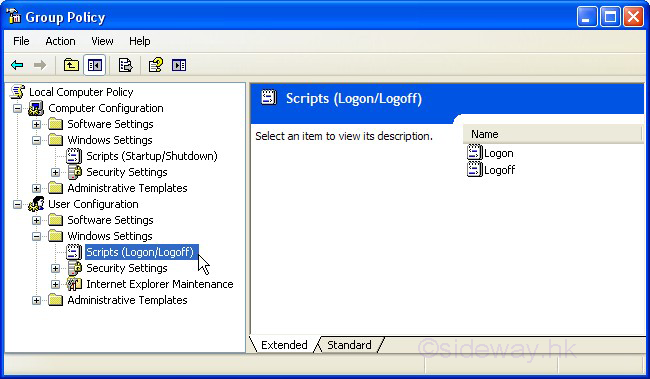
  2. Use Logon/Logoff of Windows Settings in User Configuration to set policies that are applied to users.

    1. Simular to 1 but select the 'Scripts (Logon/Logoff)' of 'Windows Settings' under 'User Configuration'.

      image 


ยฉsideway

ID: 110100016 Last Updated: 1/25/2011 Revision: 0


Latest Updated LinksValid XHTML 1.0 Transitional Valid CSS!Nu Html Checker Firefox53 Chromena IExplorerna
IMAGE

Home 5

Business

Management

HBR 3

Information

Recreation

Hobbies 9

Culture

Chinese 1097

English 339

Travel 38

Reference 79

Hardware 55

Computer

Hardware 259

Software

Application 213

Digitization 37

Latex 52

Manim 205

KB 1

Numeric 19

Programming

Web 290new

Unicode 504

HTML 66new

Common Color 1new

Html Entity (Unicode) 1new

Html 401 Special 1

CSS 65new

Selector 1

SVG 46

ASP.NET 270

OS 447new

MS Windows

Windows10 1new

.NET Framework 1

DeskTop 7

Python 72

Knowledge

Mathematics

Formulas 8

Set 1

Logic 1

Algebra 84

Number Theory 207new

Trigonometry 31

Geometry 34

Coordinate Geometry 2

Calculus 67

Complex Analysis 21

Engineering

Tables 8

Mechanical

Mechanics 1

Rigid Bodies

Statics 92

Dynamics 37

Fluid 5

Fluid Kinematics 5

Control

Process Control 1

Acoustics 19

FiniteElement 2

Natural Sciences

Matter 1

Electric 27

Biology 1

Geography 1


Copyright © 2000-2026 Sideway . All rights reserved Disclaimers last modified on 06 September 2019