Sideway
output.to from Sideway
`-=[]โŸจโŸฉ\;',./~!@#$%^&*()_+{}|:"<>? ๐‘Ž๐‘๐‘๐‘‘๐‘’๐‘“๐‘”โ„Ž๐‘–๐‘—๐‘˜๐‘™๐‘š๐‘›๐‘œ๐‘๐‘ž๐‘Ÿ๐‘ ๐‘ก๐‘ข๐‘ฃ๐‘ค๐‘ฅ๐‘ฆ๐‘ง ร…โ€‰โˆ’โ€‚ร—โ€ƒโ‹…โˆ“ยฑโˆ˜๊žŠ๏นฆโˆ—โˆ™ โ„ฏ ๐”ธ๐”นโ„‚๐”ป๐”ผ๐”ฝ๐”พโ„๐•€๐•๐•‚๐•ƒ๐•„โ„•๐•†โ„™โ„šโ„๐•Š๐•‹๐•Œ๐•๐•Ž๐•๐•โ„ค๐ด๐ต๐ถ๐ท๐ธ๐น๐บ๐ป๐ผ๐ฝ๐พ๐ฟ๐‘€๐‘๐‘‚๐‘ƒ๐‘„๐‘…๐‘†๐‘‡๐‘ˆ๐‘‰๐‘Š๐‘‹๐‘Œ๐‘ โˆผโˆฝโˆพโ‰โ‰‚โ‰ƒโ‰„โ‰…โ‰†โ‰‡โ‰ˆโ‰‰โ‰Œโ‰โ‰ โ‰ก โ‰คโ‰ฅโ‰ฆโ‰งโ‰จโ‰ฉโ‰ชโ‰ซ โˆˆโˆ‰โˆŠโˆ‹โˆŒโˆ โŠ‚โŠƒโŠ„โŠ…โІโЇ ๐›ผ๐›ฝ๐›พ๐›ฟ๐œ€๐œ๐œ‚๐œƒ๐œ„๐œ…๐œ†๐œ‡๐œˆ๐œ‰๐œŠ๐œ‹๐œŒ๐œŽ๐œ๐œ๐œ‘๐œ’๐œ“๐œ” โˆ€โˆ‚โˆƒโˆ…โฆฐโˆ†โˆ‡โˆŽโˆžโˆโˆดโˆต โˆโˆโˆ‘โ‹€โ‹โ‹‚โ‹ƒ โˆงโˆจโˆฉโˆช โˆซโˆฌโˆญโˆฎโˆฏโˆฐโˆฑโˆฒโˆณ โˆฅโ‹ฎโ‹ฏโ‹ฐโ‹ฑ โ€– โ€ฒ โ€ณ โ€ด โ„ โ— สน สบ โ€ต โ€ถ โ€ท ๏น ๏น‚ ๏นƒ ๏น„ ๏ธน ๏ธบ ๏ธป ๏ธผ ๏ธ— ๏ธ˜ ๏ธฟ ๏น€ ๏ธฝ ๏ธพ ๏น‡ ๏นˆ ๏ธท ๏ธธ โœ   โ   โŽด  โŽต  โž   โŸ   โ    โก โ†โ†‘โ†’โ†“โ†คโ†ฆโ†ฅโ†งโ†”โ†•โ†–โ†—โ†˜โ†™โ–ฒโ–ผโ—€โ–ถโ†บโ†ปโŸฒโŸณ โ†ผโ†ฝโ†พโ†ฟโ‡€โ‡โ‡‚โ‡ƒโ‡„โ‡…โ‡†โ‡‡ โ‡โ‡‘โ‡’โ‡“โ‡”โ‡Œโ‡โ‡โ‡•โ‡–โ‡—โ‡˜โ‡™โ‡™โ‡ณโฅขโฅฃโฅคโฅฅโฅฆโฅงโฅจโฅฉโฅชโฅซโฅฌโฅญโฅฎโฅฏ
Draft for Information Only

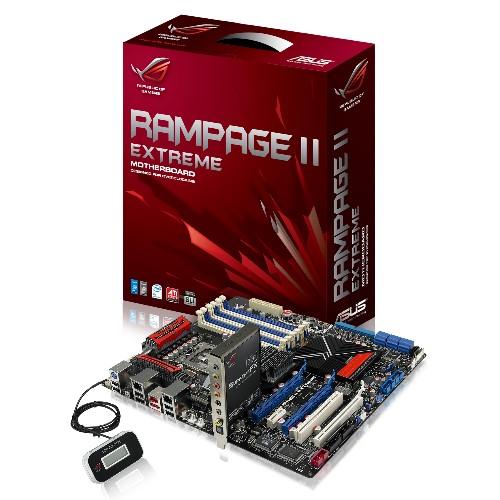
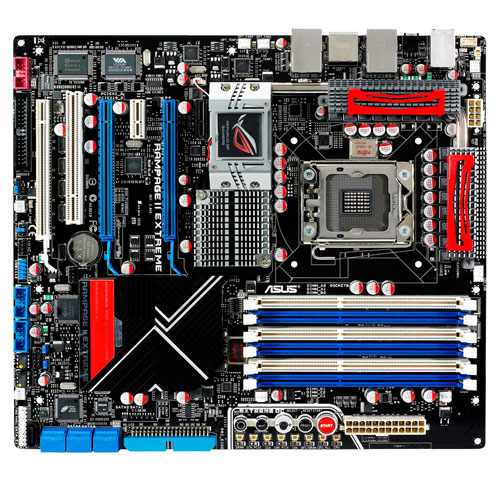
Rampage II Extreme

(information from Asus )

image image

Steps of Overclock Setting:

  1. Enter BIOS setup -> Exit to  'LOAD SETUP DEFAULTS'  to reset the bios settings. Press F10 to Exit & Save Change. Restart the PC.
  2. Enter BIOS setup again -> Extreme Tweaker
    1. to change 'AI Overclock Timer' to Manual.
    2. to set the 'BCLK Frequency' to overclock the CPU according to specification.
    3. to select the correct frequency setting for 'DRAM Frequency'
    4. to change the 'UCLK Freq' to double the value of 'DRAM Frequency' setting
    5. 'QPI LINK DATA RATE' should be reduced to a lower speed when 'BCLK Frequency' is overclocked.
    6. to change the timings of 'DRAM Setting' and 'DRAM Timing Mode' according to the specification.
    7. 'LOAD-LINE CALIBRATION' can be disabled to turn off the CPU voltage calibration.
    8. 'CPU Voltage' can be lowered to a lower voltage.
    9.  CPU PLL Voltage can be changed to 1.8V.
    10. QPI/DRAM Core Voltage can be changed to 1.55~1.65V or lower
    11. IOH can be changed to 1.3
    12. DRAM Bus Voltage should not be higher than 2.1V, if possible better lower than 1.65V
    13. Disable both the 'CPU Spread Spectrum' and 'PCIE Spread Sprectrum'
  3. Change to "Main" , "Advanced" and "Power" tabs
    1. Disable unnecessary devices and functions
    2. 'Hardware Prefetcher' and 'Adjacent Cache Line Prefetch' can be enabled
    3. Disable those unused onboard devices


The link of Asus Asus Rampage II Extreme is
http://www.asus.com/product.aspx?P_ID=W7i5W4Pw4fH22Mih&amp;templete=2.


ยฉsideway

ID: 110800007 Last Updated: 8/6/2011 Revision: 0


Latest Updated LinksValid XHTML 1.0 Transitional Valid CSS!Nu Html Checker Firefox53 Chromena IExplorerna
IMAGE

Home 5

Business

Management

HBR 3

Information

Recreation

Hobbies 9

Culture

Chinese 1097

English 339

Travel 38

Reference 79

Hardware 55

Computer

Hardware 259

Software

Application 213

Digitization 37

Latex 52

Manim 205

KB 1

Numeric 19

Programming

Web 290new

Unicode 504

HTML 66new

Common Color 1new

Html Entity (Unicode) 1new

Html 401 Special 1

CSS 65new

Selector 1

SVG 46

ASP.NET 270

OS 447new

MS Windows

Windows10 1new

.NET Framework 1

DeskTop 7

Python 72

Knowledge

Mathematics

Formulas 8

Set 1

Logic 1

Algebra 84

Number Theory 207new

Trigonometry 31

Geometry 34

Coordinate Geometry 2

Calculus 67

Complex Analysis 21

Engineering

Tables 8

Mechanical

Mechanics 1

Rigid Bodies

Statics 92

Dynamics 37

Fluid 5

Fluid Kinematics 5

Control

Process Control 1

Acoustics 19

FiniteElement 2

Natural Sciences

Matter 1

Electric 27

Biology 1

Geography 1


Copyright © 2000-2026 Sideway . All rights reserved Disclaimers last modified on 06 September 2019