|
`-=[]⟨⟩\;',./~!@#$%^&*()_+{}|:"<>? 𝑎𝑏𝑐𝑑𝑒𝑓𝑔ℎ𝑖𝑗𝑘𝑙𝑚𝑛𝑜𝑝𝑞𝑟𝑠𝑡𝑢𝑣𝑤𝑥𝑦𝑧
Å − × ⋅∓±∘꞊﹦∗∙ ℯ 𝔸𝔹ℂ𝔻𝔼𝔽𝔾ℍ𝕀𝕁𝕂𝕃𝕄ℕ𝕆ℙℚℝ𝕊𝕋𝕌𝕍𝕎𝕏𝕐ℤ𝐴𝐵𝐶𝐷𝐸𝐹𝐺𝐻𝐼𝐽𝐾𝐿𝑀𝑁𝑂𝑃𝑄𝑅𝑆𝑇𝑈𝑉𝑊𝑋𝑌𝑍
∼∽∾≁≂≃≄≅≆≇≈≉≌≐≠≡ ≤≥≦≧≨≩≪≫
∈∉∊∋∌∍ ⊂⊃⊄⊅⊆⊇ 𝛼𝛽𝛾𝛿𝜀𝜁𝜂𝜃𝜄𝜅𝜆𝜇𝜈𝜉𝜊𝜋𝜌𝜎𝜏𝜐𝜑𝜒𝜓𝜔
∀∂∃∅⦰∆∇∎∞∝∴∵ ∏∐∑⋀⋁⋂⋃ ∧∨∩∪
∫∬∭∮∯∰∱∲∳ ∥⋮⋯⋰⋱ ‖ ′ ″ ‴ ⁄ ⁗ ʹ ʺ ‵ ‶ ‷
﹁ ﹂ ﹃ ﹄ ︹ ︺ ︻ ︼ ︗ ︘ ︿ ﹀ ︽ ︾ ﹇ ﹈ ︷ ︸ ⏜ ⏝ ⎴ ⎵ ⏞ ⏟ ⏠ ⏡
←↑→↓↤↦↥↧↔↕↖↗↘↙▲▼◀▶↺↻⟲⟳ ↼↽↾↿⇀⇁⇂⇃⇄⇅⇆⇇ ⇐⇑⇒⇓⇔⇌⇍⇏⇕⇖⇗⇘⇙⇙⇳⥢⥣⥤⥥⥦⥧⥨⥩⥪⥫⥬⥭⥮⥯
Draft for Information Only
Content
Mobject
 Positioning Functions
  def center(self)
  def align_on_border(self, direction, buff=DEFAULT_MOBJECT_TO_EDGE_BUFFER)
  def to_corner(self, corner=LEFT + DOWN, buff=DEFAULT_MOBJECT_TO_EDGE_BUFFER)
  def to_edge(self, edge=LEFT, buff=DEFAULT_MOBJECT_TO_EDGE_BUFFER)
  def next_to(self, mobject_or_point, direction=RIGHT, buff=DEFAULT_MOBJECT_TO_MOBJECT_BUFFER, aligned_edge=ORIGIN, submobject_to_align=None, index_of_submobject_to_align=None, coor_mask=np.array([1, 1, 1]))
  def shift_onto_screen(self, **kwargs)
  def shift(self, *vectors)
  def set_coord(self, value, dim, direction=ORIGIN)
  def set_x(self, x, direction=ORIGIN)
  def set_y(self, y, direction=ORIGIN)
  def set_z(self, z, direction=ORIGIN)
  def move_to(self, point_or_mobject, aligned_edge=ORIGIN, coor_mask=np.array([1, 1, 1]))
   Example
    Code
    Output
Mobject
The defined positioning functions for Mobject in mobject.py
- def center(self)
- def align_on_border(self, direction, buff=DEFAULT_MOBJECT_TO_EDGE_BUFFER)
- def to_corner(self, corner=LEFT + DOWN, buff=DEFAULT_MOBJECT_TO_EDGE_BUFFER)
- def to_edge(self, edge=LEFT, buff=DEFAULT_MOBJECT_TO_EDGE_BUFFER)
- def next_to(self, mobject_or_point, direction=RIGHT, buff=DEFAULT_MOBJECT_TO_MOBJECT_BUFFER, aligned_edge=ORIGIN, submobject_to_align=None, index_of_submobject_to_align=None, coor_mask=np.array([1, 1, 1]))
- def shift_onto_screen(self, **kwargs)
- def shift(self, *vectors)
- def set_coord(self, value, dim, direction=ORIGIN)
- def set_x(self, x, direction=ORIGIN)
- def set_y(self, y, direction=ORIGIN)
- def set_z(self, z, direction=ORIGIN)
- def move_to(self, point_or_mobject, aligned_edge=ORIGIN, coor_mask=np.array([1, 1, 1]))
Positioning Functions
def center(self)
center is used to shift a Mobject with respect to the negative sense of the center of the Mobject.
def align_on_border(self, direction, buff=DEFAULT_MOBJECT_TO_EDGE_BUFFER)
align_on_border is used to align the border of a Mobject with respect to the specified direction parameter, direction, according to the specified parameters.
def to_corner(self, corner=LEFT + DOWN, buff=DEFAULT_MOBJECT_TO_EDGE_BUFFER)
to_corner is used to align the corner of a Mobject with respect to the specified corner parameter, corner, according to the specified parameters.
def to_edge(self, edge=LEFT, buff=DEFAULT_MOBJECT_TO_EDGE_BUFFER)
to_edge is used to align the edge of a Mobject with respect to the specified edge parameter, edge, according to the specified parameters.
def next_to(self, mobject_or_point, direction=RIGHT, buff=DEFAULT_MOBJECT_TO_MOBJECT_BUFFER, aligned_edge=ORIGIN, submobject_to_align=None, index_of_submobject_to_align=None, coor_mask=np.array([1, 1, 1]))
next_to is used to move a Mobject with respect to the specified mobject parameter, mobject_or_point, according to the specified parameters.
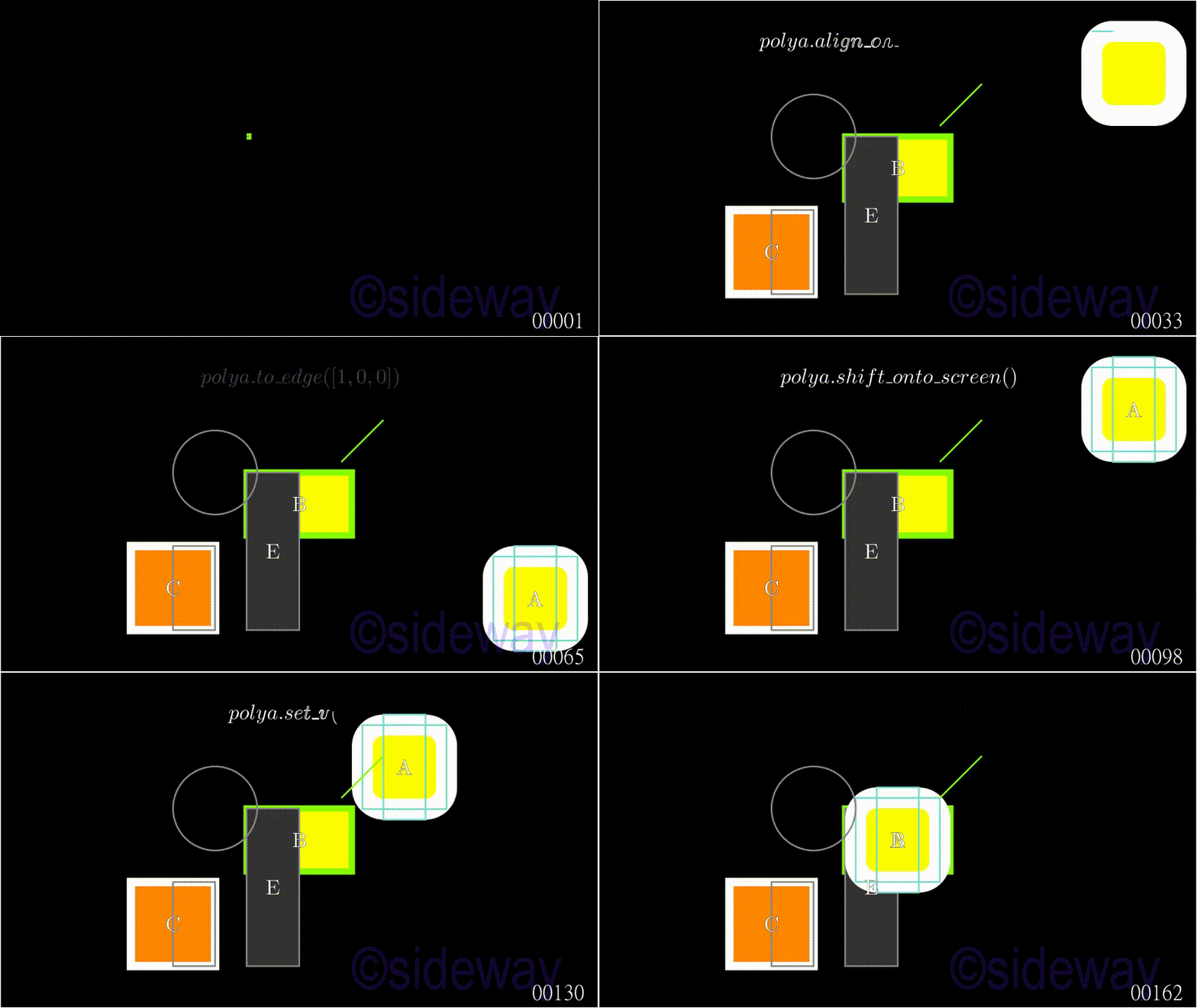
def shift_onto_screen(self, **kwargs)
shift_onto_screen is used to shift a Mobject onto screen from off screen.
def shift(self, *vectors)
shift is used to shift a Mobject with respect to the specified vectors parameter, *vectors, according to the corresponding property of the specified parameters.
def set_coord(self, value, dim, direction=ORIGIN)
set_coord is used to set the coordinate of a Mobject with respect to the specified value parameter, value , of specified dimension parameter, dim, according to the corresponding property of the specified parameters.
def set_x(self, x, direction=ORIGIN)
set_x is used to set the x dimension of a Mobject with respect to the specified x parameter, x, according to the corresponding property of the specified parameters.
def set_y(self, y, direction=ORIGIN)
set_y is used to set the y dimension of a Mobject with respect to the specified y parameter, y, according to the corresponding property of the specified parameters.
def set_z(self, z, direction=ORIGIN)
set_z is used to set the z dimension of a Mobject with respect to the specified z parameter, z, according to the corresponding property of the specified parameters.
def move_to(self, point_or_mobject, aligned_edge=ORIGIN, coor_mask=np.array([1, 1, 1]))
move_to is used to move a Mobject with respect to the specified point_or_mobject parameter, mobject_or_point, according to the specified parameters.
Example
Code
# folder/file: tut/manim_mobject_func_positioning_001a.py

from manimlib.scene.scene import Scene
from manimlib.mobject.geometry import Rectangle, Square, Circle, Line,RoundedRectangle
from manimlib.animation.creation import ShowCreation
from manimlib.mobject.svg.tex_mobject import TexMobject, TextMobject
from manimlib.animation.fading import FadeOut
from manimlib.animation.creation import Write
from manimlib.animation.transform import ApplyMethod, ApplyFunction

class manim_mobject_func_positioning_001a(Scene):
   def construct(self):
      linex=Line([2,2,0],[1,1,0],color="#88FF00")
      polya= RoundedRectangle(width=2,height=2,corner_radius=0.5,stroke_width=50,fill_color="#FFFF00",fill_opacity=1)
      polyb = Rectangle(width=2.5,height=1.5,stroke_width=15,color="#88FF00",fill_color="#FFFF00",fill_opacity=1)
      polyc= Square(side_length=2,stroke_width=20,fill_color="#FF8800",fill_opacity=1).move_to([-3,-2,0])
      polyd= Circle(arc_center=(-2,0.75,0),color="#888888")
      polya.add(Rectangle(width=2,height=2,color="#77DDCC").move_to(polya))
      polya.add(Rectangle(width=1,height=2.5,color="#77DDCC").move_to(polya))
      polya.add(TextMobject("A").move_to(polya))
      polye = Rectangle(width=1.25,height=3.75,color="#888888",fill_color="#333333",fill_opacity=1).move_to([-0.625,-1.125,0])
      polyf= Rectangle(width=1,height=2,color="#888888").move_to([-2.5,-2,0])
      self.play(ShowCreation(polyb),ShowCreation(polye),run_time=2)
      self.wait()
      self.play(ShowCreation(polyc),ShowCreation(polyf),run_time=2)
      self.wait()
      self.play(ShowCreation(polya.move_to(polyd)),ShowCreation(polyd),run_time=2)
      self.wait()
      self.add(TextMobject("B").move_to(polyb))
      self.add(TextMobject("C").move_to(polyc))
      self.add(TextMobject("E").move_to(polye))
      self.add(linex)
      self.add(Rectangle(width=14.22,height=8))
      text=TexMobject(r"polya.center()").move_to([0,3,0])
      self.play(Write(text),ShowCreation(polya.center()),run_time=3)
      self.wait()
      self.play(FadeOut(text),run_time=2)
      text=TexMobject(r"polya.align\_on\_border([1,1,0])").move_to([0,3,0])
      self.play(Write(text),ShowCreation(polya.align_on_border([1,1,0])),run_time=3)
      self.wait()
      self.play(FadeOut(text),run_time=2)
      text=TexMobject(r"polya.to\_corner([-1,-1,0])").move_to([0,3,0])
      self.play(Write(text),ShowCreation(polya.to_corner([-1,-1,0])),run_time=3)
      self.wait()
      self.play(FadeOut(text),run_time=2)
      text=TexMobject(r"polya.to\_edge([1,0,0])").move_to([0,3,0])
      self.play(Write(text),ShowCreation(polya.to_edge([1,0,0])),run_time=3)
      self.wait()
      self.play(FadeOut(text),run_time=2)
      text=TexMobject(r"polya.next\_to(polyc)").move_to([0,3,0])
      self.play(Write(text),ShowCreation(polya.next_to(polyc)),run_time=3)
      self.wait()
      self.play(FadeOut(text),run_time=2)
      text=TexMobject(r"polya.move\_to([8,6,0])").move_to([0,3,0])
      self.play(Write(text),ApplyFunction(lambda mob:mob.move_to([8,6,0]),polya),run_time=3)
      self.wait()
      self.play(FadeOut(text),run_time=2)
      text=TexMobject(r"polya.shift\_onto\_screen()").move_to([0,3,0])
      self.play(Write(text),ShowCreation(polya.shift_onto_screen()),run_time=3)
      self.wait()
      self.play(FadeOut(text),run_time=2)
      text=TexMobject(r"polya.shift([-1,-1,0])").move_to([0,3,0])
      self.play(Write(text),ShowCreation(polya.shift([-1,-1,0])),run_time=3)
      self.wait()
      self.play(FadeOut(text),run_time=2)
      text=TexMobject(r"polya.set\_coord(2,0)").move_to([0,3,0])
      self.play(Write(text),ApplyFunction(lambda mob:mob.set_coord(2,0),polya),run_time=3)
      self.wait()
      self.play(FadeOut(text),run_time=2)
      text=TexMobject(r"polya.set\_x(2.5)").move_to([0,3,0])
      self.play(Write(text),ApplyFunction(lambda mob:mob.set_x(2.5),polya),run_time=3)
      self.wait()
      self.play(FadeOut(text),run_time=2)
      text=TexMobject(r"polya.set\_y(1.5)").move_to([0,3,0])
      self.play(Write(text),ApplyFunction(lambda mob:mob.set_y(1.5),polya),run_time=3)
      self.wait()
      self.play(FadeOut(text),run_time=2)
      text=TexMobject(r"polya.set\_z(0)").move_to([0,3,0])
      self.play(Write(text),ApplyFunction(lambda mob:mob.set_z(0),polya),run_time=3)
      self.wait()
      self.play(FadeOut(text),run_time=2)
      text=TexMobject(r"polya.move\_to(polyb)").move_to([0,3,0])
      self.play(Write(text),ApplyFunction(lambda mob:mob.move_to(polyb),polya),run_time=3)
      self.wait()
      self.play(FadeOut(text),run_time=2)
Output
©sideway
ID: 200301102 Last Updated: 3/11/2020 Revision: 0
|
 |


 Nu Html Checker
  53
53  na
na  na
na