
TOCMS WindowsWindows 11 Windows 10 System CommandSystem Command on MS OS
`-=[]⟨⟩\;',./~!@#$%^&*()_+{}|:"<>? 𝑎𝑏𝑐𝑑𝑒𝑓𝑔ℎ𝑖𝑗𝑘𝑙𝑚𝑛𝑜𝑝𝑞𝑟𝑠𝑡𝑢𝑣𝑤𝑥𝑦𝑧
Å − × ⋅∓±∘꞊﹦∗∙ ℯ 𝔸𝔹ℂ𝔻𝔼𝔽𝔾ℍ𝕀𝕁𝕂𝕃𝕄ℕ𝕆ℙℚℝ𝕊𝕋𝕌𝕍𝕎𝕏𝕐ℤ𝐴𝐵𝐶𝐷𝐸𝐹𝐺𝐻𝐼𝐽𝐾𝐿𝑀𝑁𝑂𝑃𝑄𝑅𝑆𝑇𝑈𝑉𝑊𝑋𝑌𝑍
∼∽∾≁≂≃≄≅≆≇≈≉≌≐≠≡ ≤≥≦≧≨≩≪≫
∈∉∊∋∌∍ ⊂⊃⊄⊅⊆⊇ 𝛼𝛽𝛾𝛿𝜀𝜁𝜂𝜃𝜄𝜅𝜆𝜇𝜈𝜉𝜊𝜋𝜌𝜎𝜏𝜐𝜑𝜒𝜓𝜔
∀∂∃∅⦰∆∇∎∞∝∴∵ ∏∐∑⋀⋁⋂⋃ ∧∨∩∪
∫∬∭∮∯∰∱∲∳ ∥⋮⋯⋰⋱ ‖ ′ ″ ‴ ⁄ ⁗ ʹ ʺ ‵ ‶ ‷
﹁ ﹂ ﹃ ﹄ ︹ ︺ ︻ ︼ ︗ ︘ ︿ ﹀ ︽ ︾ ﹇ ﹈ ︷ ︸ ⏜ ⏝ ⎴ ⎵ ⏞ ⏟ ⏠ ⏡
←↑→↓↤↦↥↧↔↕↖↗↘↙▲▼◀▶↺↻⟲⟳ ↼↽↾↿⇀⇁⇂⇃⇄⇅⇆⇇ ⇐⇑⇒⇓⇔⇌⇍⇏⇕⇖⇗⇘⇙⇙⇳⥢⥣⥤⥥⥦⥧⥨⥩⥪⥫⥬⥭⥮⥯
Draft for Information Only
ContentBCDEdit.exe
BCDEdit.exeBCDEdit.exe is a command-line tool for managing Boot Configuration Data (BCD).System Command BCDEdit.exeBCDEdit is the primary tool for editing the boot configuration of Windows.Syntaxbcdedit /command [<argument1>] [<argument2>] ⋯
Parameter/commandto specify the command switch <argument1>, <argument2>, ⋯to specify the corresponding argumentsBCDEdit CommandRunning "bcdedit" by itself is equivalent to running "bcdedit /enum ACTIVE".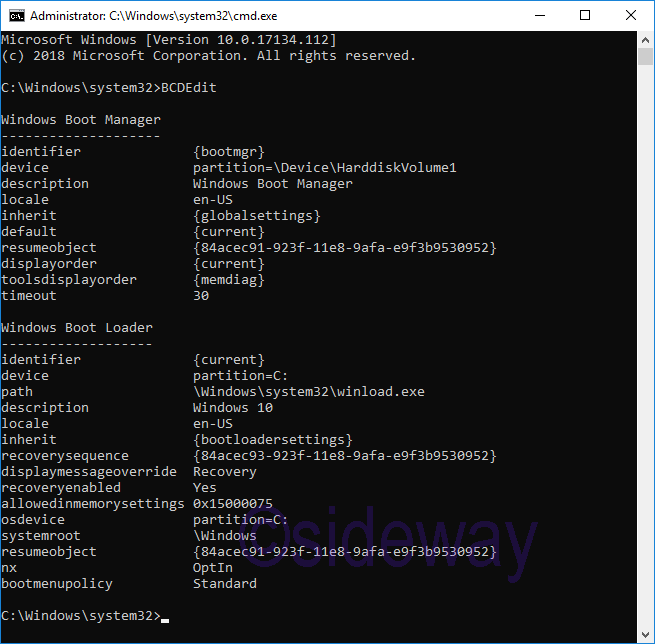
BCDEdit HelpRunning "bcdedit /?" or "bcdedit /help" is to display the help of command bcdedit.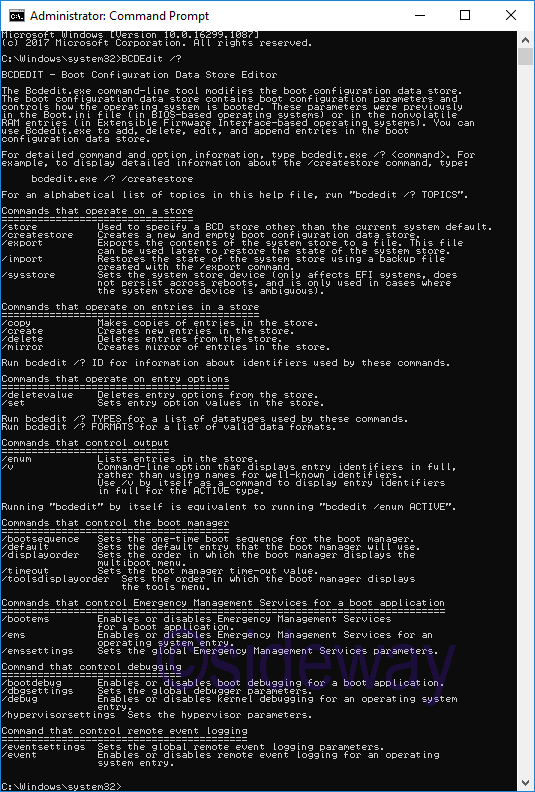
syntaxBCDEdit /?
Help ListBCDEDIT - Boot Configuration Data Store EditorThe Bcdedit.exe command-line tool modifies the boot configuration data store. The boot configuration data store contains boot configuration parameters and controls how the operating system is booted. These parameters were previously in the Boot.ini file (in BIOS-based operating systems) or in the nonvolatile RAM entries (in Extensible Firmware Interface-based operating systems). You can use Bcdedit.exe to add, delete, edit, and append entries in the boot configuration data store. GeneralFor detailed command and option information, type bcdedit.exe /? <command>. For example, to display detailed information about the /createstore command, type: bcdedit.exe /? /createstoreFor an alphabetical list of topics in this help file, run "bcdedit /? TOPICS". Operate on a store/store Used to specify a BCD store other than the current system default. /createstore Creates a new and empty boot configuration data store. /export Exports the contents of the system store to a file. This file can be used later to restore the state of the system store. /import Restores the state of the system store using a backup file created with the /export command. /sysstore Sets the system store device (only affects EFI systems, does not persist across reboots, and is only used in cases where the system store device is ambiguous).Operate on entries in a store/copy Makes copies of entries in the store. /create Creates new entries in the store. /delete Deletes entries from the store. /mirror Creates mirror of entries in the store. Run bcdedit /? ID for information about identifiers used by these commands.Operate on entry options/deletevalue Deletes entry options from the store. /set Sets entry option values in the store. Run bcdedit /? TYPES for a list of datatypes used by these commands.Run bcdedit /? FORMATS for a list of valid data formats. Control output/enum Lists entries in the store. /v Command-line option that displays entry identifiers in full, rather than using names for well-known identifiers. Use /v by itself as a command to display entry identifiers in full for the ACTIVE type. Running "bcdedit" by itself is equivalent to running "bcdedit /enum ACTIVE".Control the boot manager/bootsequence Sets the one-time boot sequence for the boot manager. /default Sets the default entry that the boot manager will use. /displayorder Sets the order in which the boot manager displays the multiboot menu. /timeout Sets the boot manager time-out value. /toolsdisplayorder Sets the order in which the boot manager displays the tools menu.Control Emergency Management Services for a boot application/bootems Enables or disables Emergency Management Services for a boot application. /ems Enables or disables Emergency Management Services for an operating system entry. /emssettings Sets the global Emergency Management Services parameters.Control debugging/bootdebug Enables or disables boot debugging for a boot application. /dbgsettings Sets the global debugger parameters. /debug Enables or disables kernel debugging for an operating system entry. /hypervisorsettings Sets the hypervisor parameters.Control remote event logging/eventsettings Sets the global remote event logging parameters. /event Enables or disables remote event logging for an operating system entry.Remarks
Sources and References
©sideway ID: 210400005 Last Updated: 4/5/2021 Revision: 0 Latest Updated Links
  Nu Html Checker Nu Html Checker  53 53  na na  na na |
 Home 5 Business Management HBR 3 Information Recreation Hobbies 9 Culture Chinese 1097 English 339 Travel 53 Reference 79 Hardware 55 Computer Hardware 261 Software Application 213 Digitization 37 Latex 52 Manim 205 KB 1 Numeric 19 Programming Web 290 Unicode 504 HTML 66 CSS 65 Selector 1 SVG 46 ASP.NET 270 OS 447 MS Windows DeskTop 7 Python 72 Knowledge Mathematics Formulas 8 Set 1 Logic 1 Algebra 84 Number Theory 207 Trigonometry 31 Geometry 34 Calculus 67 Engineering Tables 8 Mechanical Rigid Bodies Statics 92 Dynamics 37 Fluid 5 Control Acoustics 19 Natural Sciences Matter 1 Electric 27 Biology 1 |
Copyright © 2000-2026 Sideway . All rights reserved Disclaimers last modified on 06 September 2019
